Personal Loans Australia Personal Loan Repayment Calculator
Calculate repayments with our Personal Loan Calculator. Compare loan terms, view repayment schedules, and plan your personal finance with confidence.
Calculator results are estimates based on the inputs and assumptions used and are provided for general information only. They are not quotes, offers, approval or eligibility decisions, or personalised recommendations. Actual loan costs and repayments may differ.
Personal Loan Details:
Important!
Personal Loan Interest Rates differ from lender to lender and will depend on your individual circumstances (credit history, employment status, age, etc.).
Personal Loan Amortisation Calculator
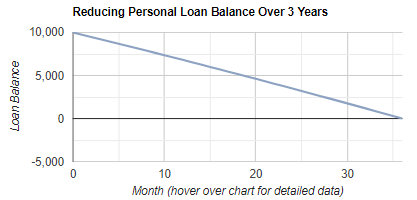
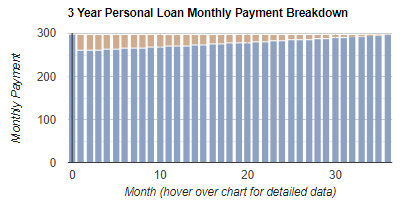
The following amortisation graphs detail month-by-month data on the progress of the proposed loan. The first chart below examines the reducing loan balance over the course of the finance contract term. The second graph illustrates the portion of each monthly repayment allocated to payment of interest vs principal reduction.
How to use our Personal Loan Repayment Calculator
Our Personal Loan Repayment Calculator helps you estimate your ongoing loan repayments and the total cost of borrowing before you apply. By adjusting the loan amount, loan term and interest rate, you can compare scenarios and choose a repayment level that better fits your budget. It also provides an amortisation view so you can see how each repayment is split between interest and principal over time.
Important note for ASIC compliance: this calculator provides general information only and does not take into account your objectives, financial situation or needs. Results are estimates and may not include lender fees, comparison rates, commissions, insurance, redraw features, or changes to your interest rate. Always check a lender’s final quote and loan contract before deciding.
How to complete the form for the best result
1. Loan Amount Required: Enter the total amount you want to borrow in Australian dollars as a whole number (no decimals or commas). Use the amount you actually need, not the maximum you might be approved for, to avoid overpaying interest.
2. Term of Loan: Select the number of years you plan to repay the loan over. A longer term can reduce the monthly repayment, but typically increases the total interest paid over the life of the loan.
3. Interest Rate: Choose an annual interest rate for the simulation. If you have a lender quote, use that rate. If not, test a conservative range to understand best case and worst case outcomes.
4. Calculate: Click the calculate button to generate your results.
How to interpret the results
1. Repayment estimate: Treat the repayment figure as your baseline commitment. Stress-test your budget by increasing the rate or shortening the term to see if repayments remain affordable.
2. Amortisation and graphs: Review the month-by-month amortisation view and charts to understand how the balance reduces and how early repayments often include a higher interest portion, shifting toward more principal over time.
3. Compare scenarios: Re-run the calculator with different terms and rates to balance affordability (cash flow) against total interest (overall cost).
Personal loan interest rates are only one part of the borrowing cost. This guide explains how interest rates, comparison rates, fees and loan terms affect repayments and the total cost of a personal loan in Australia. - read more
As a first-time borrower, understanding the importance of budgeting is crucial. Effective budgeting can make all the difference in achieving financial stability and meeting your financial goals. It helps you manage your income, control your spending, and save for future needs. - read more
A pre-approval loan is an agreement between a lender and a borrower indicating how much the lender is willing to lend to the borrower, subject to certain conditions. - read more
The Reserve Bank of Australia’s latest retail payments update offers another useful snapshot of how households are managing everyday spending, card use and short-term credit. While payment data is not the same as loan approval data, it can still tell borrowers something important: the way money moves through a household each month can affect how comfortable a lender feels about future repayments. - read more
The Reserve Bank of Australia’s latest lending rate statistics are a useful reminder that personal borrowing costs can vary widely, even when the broader cash rate outlook appears steady. For households considering a car loan, debt consolidation loan or unsecured personal loan, the key issue is not simply whether rates are rising or falling. It is whether the loan being offered is affordable, suitable and competitive for the borrower’s circumstances. - read more
The Reserve Bank of Australia’s latest financial aggregates add another layer to an ongoing story for personal loan borrowers: consumer credit remains an important pressure point for household budgets, even as interest rate settings stay under close watch. - read more